
How To Set Up An Effort Grade System
title: "How to Set Up an Effort Grade System" url: https://help.opensis.com/portal/en/kb/articles/how-to-set-up-an-effort-grade-system path: openSIS Administration > Grades Administration
How to Set Up an Effort Grade System
How to Set Up an Effort Grade System
Setting up an effort grading system can provide a valuable way to assess and motivate students by focusing on their work ethic and engagement. This article will guide you through the step-by-step process of configuring an effort grade system in your school's grade management software.
Step-by-Step Guide to Setting Up Effort Grades
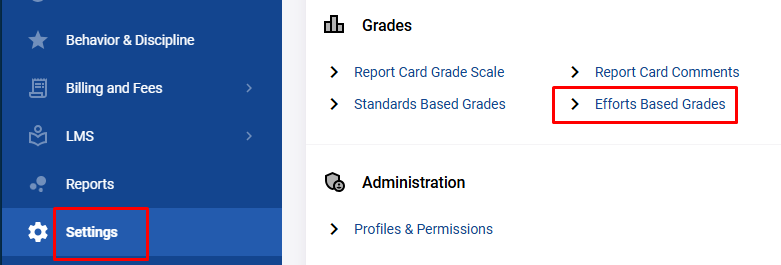
Step 1: Access the Settings Menu
To begin setting up effort grades:
Step 2: Select "Efforts Based Grades"
- Under the Grades section, choose the Efforts Based Grades option.
- This will lead you to the interface where you can configure your effort grade system.
Step 3: Define Effort Grade Scale
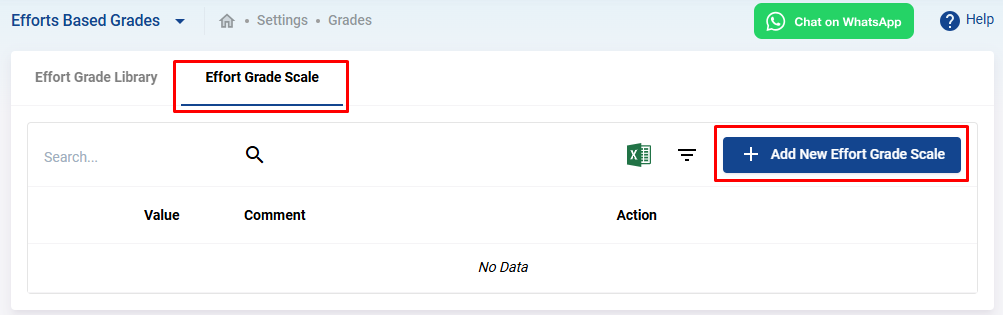
- Click on the Efforts Grade Scale tab to define the scale on which students will be graded based on effort.
- To add a new scale, click the Add New Effort Grade Scale button.
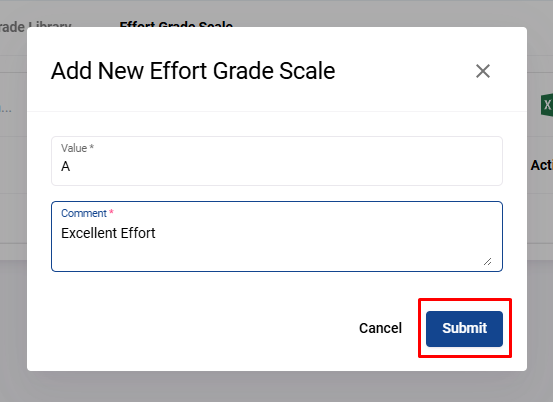
- A form will appear where you can fill in the grade value (e.g., A, B, C or 1-4) and a description (e.g., Excellent Effort, Satisfactory Effort).
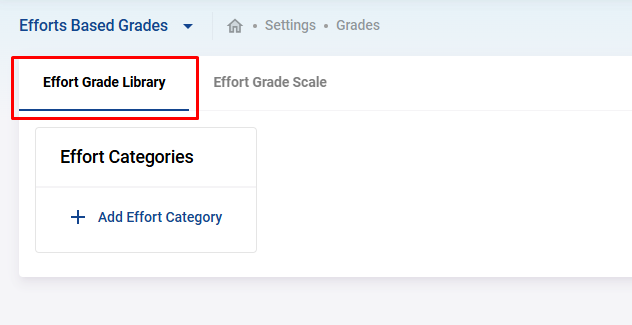
Step 4: Configure the Effort Grade Library
After setting the grade scale, you need to configure the criteria by which students will be assessed.
Step 5: Create Effort Grade Categories
Effort categories represent broader areas under which specific effort items will be grouped, such as Class Participation or Homework Completion.
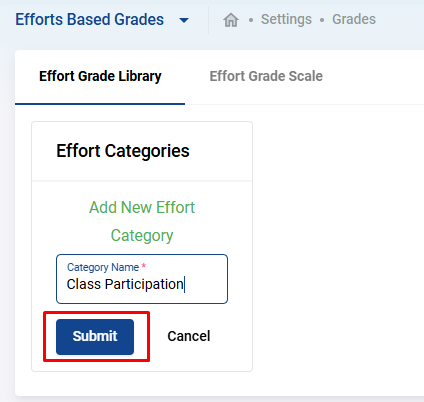
- Click on the Add Effort Category button to create a new category.
- Enter the Category Name (e.g., "Class Engagement" or "Homework Dedication") and click Submit.
Step 6: Add Effort Items
Effort items are specific criteria within each category, representing how students will be graded.
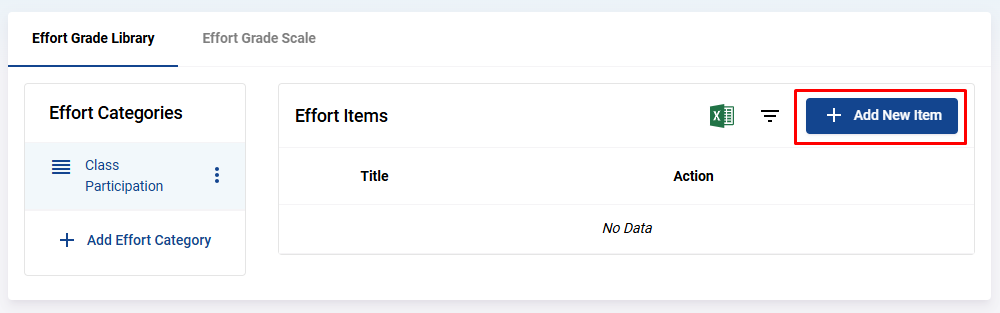
- Once your category is created, click the Add New Item button to add an effort item.
- You will be prompted to provide the Item Title (e.g., "Timely Homework Submission" or "Active Class Discussion") and click Submit.

Managing Effort Grades
Editing Effort Grades or Items
If you need to adjust any existing grades or effort items:
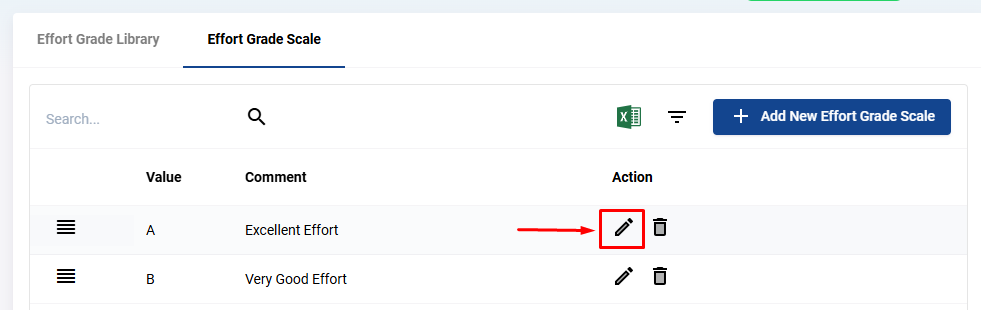
- To edit an effort grade scale , click the pencil icon next to the grade you want to modify.
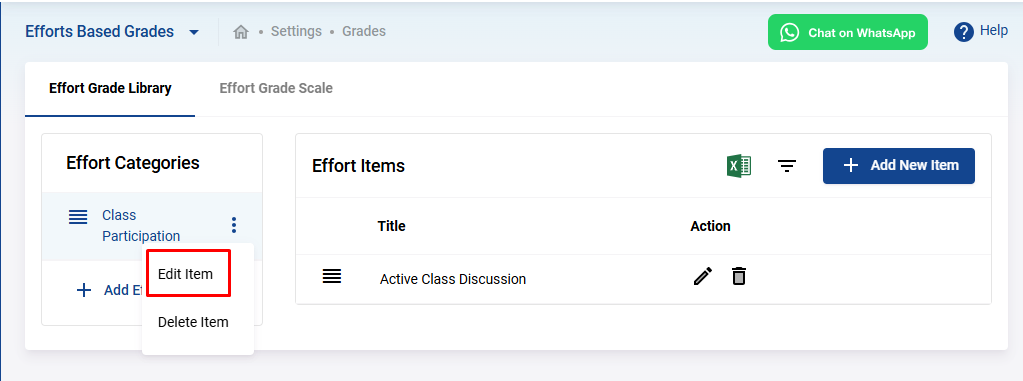
- To edit an effort category , click the three dots next to the category name and select Edit Item.
- For editing effort items , use the pencil icon next to the specific item within the category.
Deleting Effort Grades or Items
In case you need to remove any scale, category, or item:
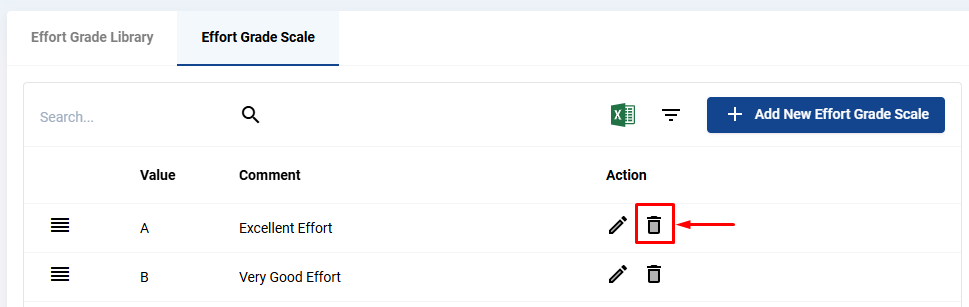
- To delete an effort grade scale or item , click the trash icon next to it.
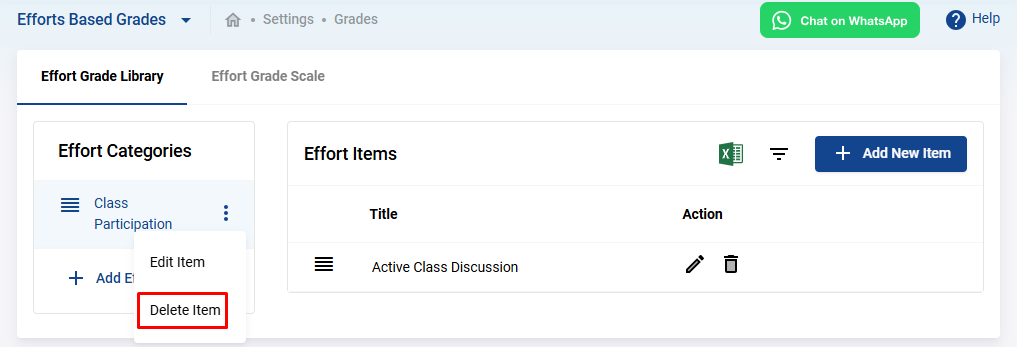
- To delete an effort category , click on the three dots next to the category name and select Delete Item.
By following these steps, you can effectively set up an effort grading system that helps track and reward student effort in various aspects of their academic experience. This system not only encourages a strong work ethic but also provides students and teachers with clear criteria for evaluating engagement and effort.
Standards-based grading (SBG) is a system of evaluating students' mastery of specific learning goals or standards, rather than relying on traditional letter grades. Unlike conventional grading systems that assess performance based on percentages or ...
Graduation requirements are the specific criteria that students must meet to earn their diplomas, degrees, or certificates. These requirements ensure that students have successfully completed the necessary coursework and accumulated the required ...
Creating custom categories and fields in openSIS allows you to store and manage school-specific information tailored to your unique needs. Here's a step-by-step guide on how to create custom categories and fields for your school. Step 1: Access the ...
Setting up an email server in openSIS is essential for sending notifications, alerts, and other important communications to users directly via email. openSIS offers two methods to set up the email server: SMTP relay server and API. Below are the ...
What is a Subscription? A subscription is a recurring payment charged to a user at specified intervals. In openSIS, this feature enables schools to set up automatic deductions of subscription fees from student accounts. For the system to work ...