Setting Up Standards Based Grading In CrownSIS
Setting Up Standards-Based Grading in CrownSIS
Standards-based grading (SBG) is a system of evaluating students' mastery of specific learning goals or standards, rather than relying on traditional letter grades. Unlike conventional grading systems that assess performance based on percentages or averages, SBG focuses on how well students have mastered the content in relation to established standards. This approach gives students, teachers, and parents a clearer understanding of student progress and areas needing improvement.
Step-by-Step Guide to Set Up Standards-Based Grading in CrownSIS
Here is how you can set up a standards-based grading system in your school’s information platform.
1. Access the Standards-Based Grades Section
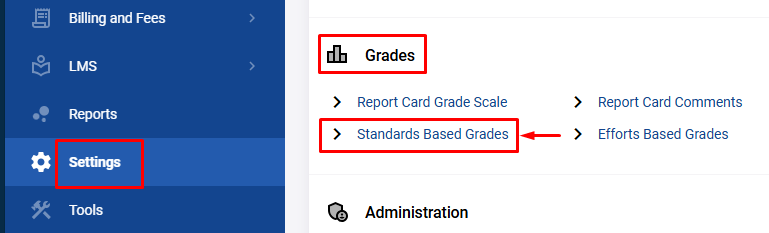
- Start by logging into your school’s system and navigating to the Settings menu from the navigation panel.
- Under the Grades section, look for Standards Based Grades and click on it. This will take you to the area where you can configure your grading system based on the standards.
2. Setting Up the Grade Scale
Before adding the specific standards for each course, you need to set up the grading scale that will be used to assess students’ performance.
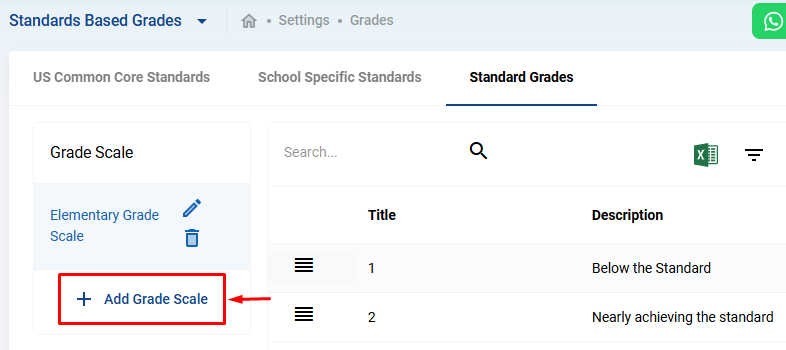
- In the Standards Based Grades area, click on Standard Grades.
- Here, click the Add Grade Scale button to create a new grading scale.
- Give the grading scale a name. For example, you could name it “Mathematics Standards Scale” or “Science Performance Scale” depending on the subject.
3. Adding Specific Grades to the Scale
Once your grading scale is named, it's time to define the performance levels (standards) that students can achieve.
- Click on Add New Grade.
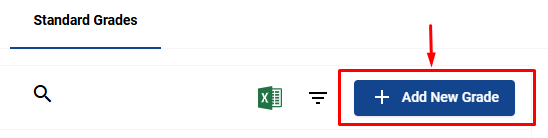
- You will be prompted to add a Title and a Description for each grade level.
- For example:
- Title: “1”
Description: “Below the Standard” - Title: “2”
Description: “Approaching the Standard” - Title: “3”
Description: “Meets the Standard” - Title: “4”
Description: “Achieved the Standard with Excellence”
- Title: “1”
- For example:
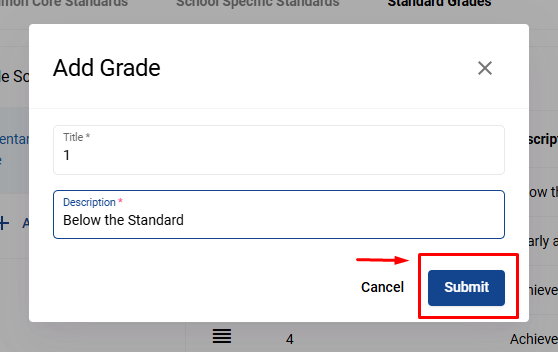
These labels should reflect varying levels of mastery for each standard, helping teachers provide clear feedback.
4. Adding Standards
Now that your grade scale is set, it’s time to add the specific standards that students will be assessed on. These standards will vary based on the subject, course, and grade level.
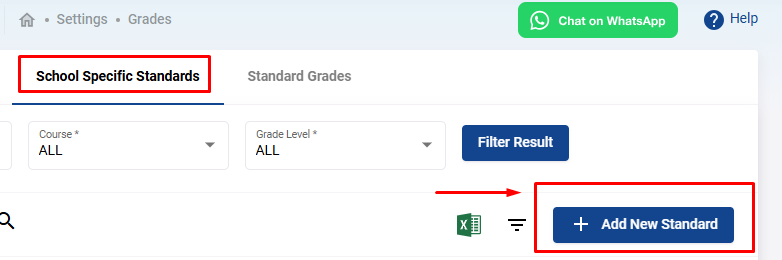
- Go to the School Specific Standards tab.
- To add a new standard, click on the Add New Standard button.
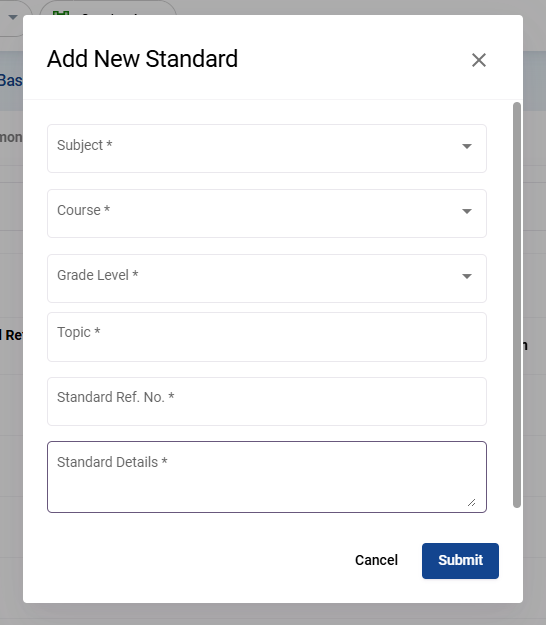
- Fill out the following fields:
- Subject : Select the subject (e.g., Mathematics).
- Course : Choose the course associated with that subject (e.g., Algebra).
- Grade Level : Select the grade level this standard applies to (e.g., Grade 8).
- Standard : Name the specific standard (e.g., Mathematical Reasoning).
- Description : Write a brief description explaining what this standard entails (e.g., “Ability to explain reasoning in basic mathematical processes.”).
5. Applying Standards in Grading
Once the standards and the grading scale are set, teachers can begin using them to assess student performance. For example, in an Algebra class (Mathematics), the teacher might evaluate a student’s “Mathematical Reasoning” based on the standard you set.
- If the student demonstrates a deep understanding of the material, the teacher may assign a “4” based on the “Achieved the Standard with Excellence” grade description.
- If the student struggles, they might receive a “1,” indicating that they are “Below the Standard.”
Benefits of Standards-Based Grading
- Transparency : Students and parents understand exactly what skills and knowledge are being assessed.
- Targeted Feedback : Teachers can provide detailed feedback on specific areas where a student is excelling or needs improvement.
- Focus on Mastery : The emphasis is on learning and growth rather than achieving a particular letter grade.
Setting up standards-based grading requires careful planning, but the transparency and clarity it provides to students, teachers, and parents make it an incredibly valuable approach to education.